

TouchChat and CoughDrop's AAC apps have some key differences. TouchChat offers extensive vocabulary options and customizable layouts, making it great for early communication and motor planning. In contrast, CoughDrop focuses on simplicity and affordability, making it easy to get started and ideal for those needing behavior supports. In the table below, we'll compare features like pricing, vocabulary, and ease of use to help you decide which AAC app is best for your needs.


CoughDrop |
TouchChat |
|
|---|---|---|
| Good for Early Communication |

Cough drop can work for early users but is often helpful for adults and users that do not have good dexterity. Users can enable eye tracking to sync with eye gaze.
|
Is great for kids who need an interactive board that guides them to make sentences based on the selected word.
|
| Affordable Pricing |
CoughDrop is $9/mo OR $295 for a lifetime payment. However, they charge a $25 fee for a "superviser" account, which allows other caregivers access to edit the board. There is a 2-month free trial option.
|
The $9.99 lite version has no voice output, which can defeat much of the purpose of the app. The HD version is $149.99 and pro version is almost $300. There is no family sharing. Dedicated devices cost over $4,000.
|
| Easy to Get Started |

Estimated time: 15-20 minutes. CoughDrop guides the user through set up. Although customizing coughdrop's AAC talker app is pretty straightforward, there is not much onboarding support from the CoughDrop team.
|
There is an intense programming set up process and a 108-page manual for parents.
|
| Easy Parent Modeling |

Modeling is done through a search function on cough drop's interface. It will highlight a path, but the search must be done on the AAC device itself, leaving search and other settings exposed for user to get distracted by while in speak mode.
|
The Word Finder feature is on the app itself within the keyboard functionality, meaning caregivers must take the device away from the user to show them how to find a word.
|
| Incentives to Practice |
CoughDrop allows users to set goals and badges for practicing within the application.
|
TouchChat does not have any internal motivators to practice.
|
| Natural Voices and Language Availability |

CoughDrop's premium voices are only available on iOS, Android and Amazon apps. Voice settings also depend on the device being used. Although there is a multitude of languages and accents, the flexibililty in voice selection is not consistent.
|
Available in English, Spanish, Hebrew, and Arabic. However, many voices have to be purchased separately.
|
| Customer Support |
The only support available is through FAQ articles, videos, and email communication.
|
LiveChat or calling support is only offered when subscribed to a premium support plans. If you are using the Lite app, you have to rely on support articles for help.
|
| Motor Planning |
Yes. CoughDrop's users learn through muscle memory. Words do not move, and others can be hidden.
|
The vocabulary avaiable is WordPower, a word-based page set made by Nancy L. Inman, M.A.T., CCC-SLP. This type of board helps users create sentences "on the fly."
|
| Simplicity of the Screen |
More advanced users are set up with an overwhelming grid with very small buttons.
|
Buttons are often small and thin in size when using it to its fullest potential, requiring good finger dexterity.
|
| Affordable and Dedicated Device Option |
No dedicated device offered. Users have to go through a third party and pay separately for CoughDrop software on the device.
|
The only available dedicated device is a NovaChat by Saltillo or TouchChat Express, which are over $4,000 in cost.
|
| Communication With Spelling |
CoughDrop has a keyboard screen that provides the ability to spell words from scratch. This keyboard is used by many older users. The keyboard can be found in a side bar shortcut.
|
TouchChat offers a keyboard for creating words from letters. It also has head tracking.
|
| Reminders to Practice |
CoughDrop does not have reminders that help encourage users to practice.
|
No built-in incentives to grow in communication.
|
| Image and Symbol Quality |
CoughDrop uses Open Symbols, an open source collection of symbols for communication.
|
You have to purchase additional symbol libraries and voices to make it uniquely customized.
|
| Fun Games to Build Skills |
CoughDrop offers little in regard to improving dexterity outside of consistent AAC practice. No supporting features.
|
TouchChat has no external or supporting games that improve AAC users' finger dexterity.
|
| Care Team Access |
CoughDrop charges per-communicator, so all care team members can create an account for free.
|
The app is limited to devices logged in on the apple ID used to purchase the software.
|

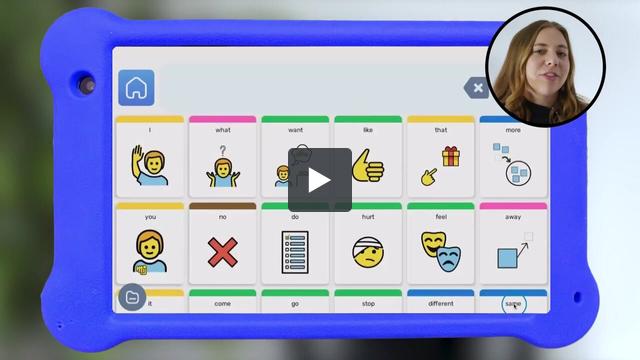
See how Goally’s AAC talker app is teaching language with higher quality than other AAC apps at an affordable price for all families.


We know kids can be tough on devices. If your Goally breaks within 90 days, we’ll replace it for free.